
10 Solid Tips to Safeguard Your Facebook Privacy
This guide will show what you can (and cannot) do to safeguard your Facebook privacy.
1. Organize Friends in Lists
What do you do when your boss, mother-in-law, or a casual web acquaintance sends you a friend request on Facebook? Use Friend Lists. Friend Lists are the foundation of your Facebook privacy settings. Select Friends from the top menu, and use the Create link to create friend lists like Co-workers, Family, College Friends, etc. Your friends can’t see your lists, so you can name them whatever you like.
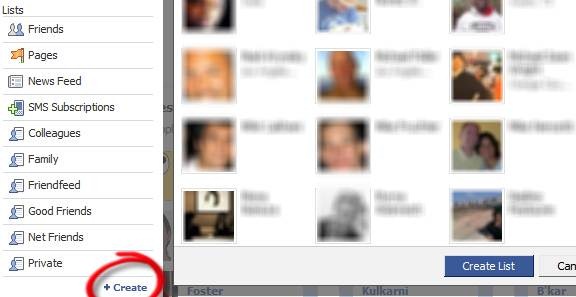
Tip: On your left sidebar, all your friend lists may not show up by default. Click More to see all of them, and drag and drop those you want above the separator.
2. Customize Profile Privacy
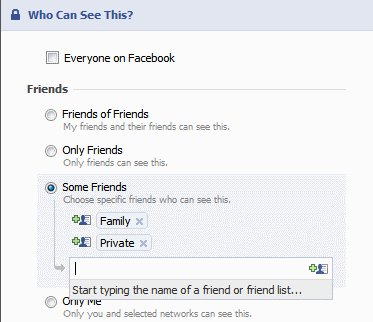
Click Settings > Privacy Settings > Profile. Select which parts of your profile will be seen by whom.

If you choose Customize in the drop down, you can be more specific. This is where the Friend Lists you created before become really useful.
Also go to the Contact Information tab and choose how you want your contact information to be shared on the Internet.
3. Set Facebook Privacy Level of Photo Albums
On the Photos tab of your profile page, click Album Privacy. Here again, you can use your Friend Lists to set the privacy for each photo album.
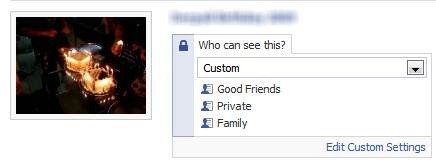
Note that your profile pictures go into a special album that is always visible to ALL your friends.
4. Restrict Search Visibility
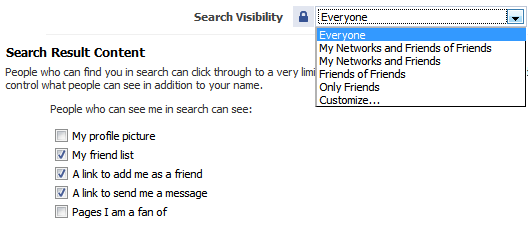
Click Privacy > Search to set your visibility when someone searches Facebook for people. This is an important way to safeguard your Facebook privacy. You can also select what will be visible in the search results.
5. Control Automatic Wall Posts and News Feed Updates
Your actions in Facebook such as comments, likes, appear as highlights on ALL your friends’ home pages. You cannot use friend lists here, only turn them on or off.
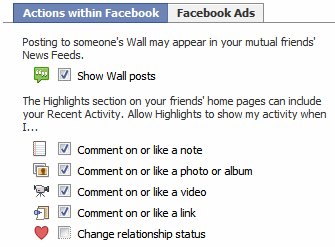
Go to Privacy > News Feed and Wall and choose whether you want your boss or ex-girlfriend to know that you’re in a relationship.
6. Set Facebook Wall Privacy
Go to your profile page, click Options > Settings under the status box.

Here you can control whether your friends can post to your Wall, and who can see the posts made by your friends.
7. Avoid Appearing in Advertisements
Facebook has two types of advertisements: third-party and Facebook. Third-party advertisements are currently not allowed to use your pictures, but there is a setting to disallow it if it is allowed in the future. Go to Privacy > News Feed and Wall > Facebook Ads tab to turn this off.

The Facebook ads shown to your friends are about ‘social actions’ like becoming a fan of something. You can turn this off at the bottom of the page.
8. Protect Yourself from Friends’ Applications
Go to Privacy > Applications, and click the Settings tab and uncheck all the boxes. These settings control what information about you is visible to applications installed by your friends. By default, these are set to visible. This means that your religious, sexual, and political preferences, pictures, etc. are readily available to one of the million worldwide Facebook application developers, each time any of your friends takes a quiz, plays a game, or runs any other Facebook app. This is obviously a Facebook privacy issue.
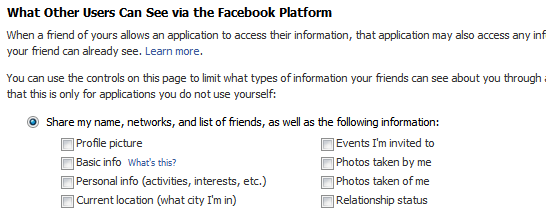
This is the most commonly misunderstood aspect of Facebook privacy. These settings control what applications installed by your friends can see about you, even if you don’t install the application yourself.
Why is this important? Because these settings will not change anything about what you are sharing with the applications you install yourself. For that, go to the next step.
9. Privacy from Your Applications
There is no way to control what applications see about you; it is an all-or-nothing affair. Take this quiz developed by the American Civil Liberties Union to check what anonymous application developers can know about you and your friends each time you take a quiz.
The Burton Group’s Identity blog features the Facebook Privacy Mirror, an application that you can use to find out what applications know about you and your friends. If you really want to see exactly what profile data of each of your friends is visible to application developers, Privacy Mirror shows it in detail.
The only thing you can do is to authorize only those applications you require and trust. Go to Settings > Application Settings from the top menu. Change the drop-down from Recently Used to Authorized. Here you can see all the applications you have authorized to get access to ALL your profile information. Remove the ones you no longer need.

Also check the list of applications Allowed to Post and Granted Additional Permissions to remove unwanted ones.
10. Quitting Facebook? Delete, Don’t Just De-Activate Your Account
You can easily deactivate your account in Facebook from the Settings page. But deactivation will retain all your profile information within Facebook, including pictures, friends, etc. If you want to permanently delete your Facebook account, click here to submit a deletion request. Note that:
1. There is an unspecified delay between submitting your delete request and actual deletion.
2. If you login to Facebook, your deletion request is automatically cancelled.
3. There doesn’t seem to be any way to confirm that your request was completed.
4. Even after permanent deletion, Facebook says that copies of your photos may remain on their servers for technical reasons.
Also, note that once in a while, there is news of a Facebook hack or leak that can expose your information on the Internet. It is better to be safe than sorry by avoiding using Facebook for anything that may embarrass you.
I hope this article gives you a better understanding and insight into Facebook’s fragile privacy. Have any questions or concerns? Liked the post? Please tell us in the comments!
under
general info.,
tips and trick,
tutorials.
3
talkbacks.

Manila Bulletin (take a look)

" here's the closer view "
 "carefully moves the coffin of President Arroyo" ?
and this

omg

under
funny stuff,
general info.,
Mix jokes,
random,
Unique Pictures.
4
talkbacks.
Corazon Aquino, Former Philippine President dies at 76
 It's a sad day in Philippine history...
Our Former President Corazon Cojuangco Aquino, (January 25, 1933 – August 1, 2009). She was the first female president of the Philippines; the icon of democracy and was Asia's first female president. Has past away at the ages of 76 on saturday this morning after being diagnosed with an colon cancer. Finally she's already with our creator. After battling colon cancer for more than a year.“I would rather die a meaningful death than to live a meaningless life.”
May she rest in peace.
-Cory-
Her family made an official statement announcing the death of their mother:
"Our mother peacefully passed away at 3:18 a.m., August 1, 2009, of cardio-respiratory arrest.
under
general info.,
news,
random.
2
talkbacks.
Detect Invisible Users in Yahoo Messenger w/o any software

New!
Welcome to your favorite yahoo detector!
It can now check invisible IDs on Yahoo! Webmessenger, Meebo, Pidgin, eBuddy and other.
You put a Yahoo Messenger ID in the box and click Check user. It will check and show you if the yahoo ID is invisible, online or offline. It also shows the avatar and other information about yahoo IDs.
Why should I use this?
Because it's a simple and effective way to detect invisible buddies, you don't have to install other software which might be malware, spyware or other security risks.
I see an ID online but the site shows it invisible. What's wrong?
That user has the "Allow websites to show when I am online" option unchecked in Yahoo Messenger Prefferences under Privacy. This means that he or she appears to be invisible or offline to websites such as Yahoo Mail that shows the status of each user name by adding a smily face next to each id in emails.
When I'm online, I see an ID offline, but the site shows it online. What's wrong?
In this case, that ID marked you "Appear permanently offline to
Michael Jackson and the Number7

Soo...What's with it???? and what's behind on it.
We all know of those so called superstitious beliefs we have , like don’t walk under a ladder, don’t cross a black cat are just example of it. And now are you superstitious? But there are still people who are very superstitious that it could really affect in their lives.
According to TMZ, the number 7 has cropped up a lot of times in the King of Pop’s life.
Michael Jackson signed his will on 7/7/02.
Michael Jackson's memorial was on 7/7/09 ... exactly 7 years after the will was signed.
Michael Jackson's two biggest hits -- "Black & White" and "Billie Jean" -- were each #1 for 7 weeks.
Michael Jackson's three biggest albums -- "Thriller," "Bad" and "Dangerous" -- each produced 7 top 40 hits.
Michael Jackson was the 7th of 9 children.
Michael Jackson was born in 1958 ... 19 + 58 = 77
Michael Jackson died on the 25th ... 2 + 5 = 7
Michael Jackson has 7 letters in his first and last name.
If you're looking for lottery numbers tonight, we recommend something with the number 7 in it.
under
general info.,
news,
open discussions.
1 talkbacks.
How to Prevent Users from Changing Desktop Wallpaper
 If you run a company, you might want to set your company logo or any particular wallpaper on all of your users' desktops. On the other hand, if you use a single system you might still want to have your desired wallpaper on Desktop and it really annoys when someone changes the wallpaper.
So if you are tired from people changing the wallpaper and want to prevent users from changing it everyday, then this tutorial will help you.
In this tutorial, you'll learn a way to set your desired wallpaper on Desktop and no one will be able to change it neither from Desktop Properties nor by right-clicking on an image and select "Set as Desktop Background".
So here we start our tutorial:
1. Type regedit in RUN dialog box or Startmenu Search box and press Enter. It'll open registry Editor.
2. Now go to following key:
HKEY_CURRENT_USER\Software\Microsoft\Windows\CurrentVersion\Policies
3. Under "Policies" key, create a new key "System". It might already exist in some systems.
4. Now select "System" key and in right-side pane, create a new STRING value Wallpaper and set its value to the exact path of your desired wallpaper. You can use .JPG and .BMP files in this method.
e.g. if your wallpaper exists in "E:\Wallpapers\Wall1.JPG", then set the same path as value of "Wallpaper".
5. You can also set the wallpaper style e.g. Centered, Tiled or Stretched. Create a new STRING value WallpaperStyle and set its value to as following:
* 0 (Centered)
* 1 (Tiled)
* 2 (Stretched)
6. That's it. Now restart or log off your system and no one will be able to change the wallpaper.
10 ways to avoid viruses and spyware
 Computer users should follow security practices to minimize virus, spyware, and malware exposure especially who are having their internet connection. I advice that you should follow these handy reference list of 10 steps on how users like us can adopt to avoid infection.
These are the 10 steps:
1: Install quality antivirus
2: Install real-time anti-spyware protection
3: Keep anti-malware applications current
4: Perform daily scans
5: Disable autorun
6: Disable image previews in Outlook
7: Don’t click on email links or attachments
8: Surf smart
9: Use a hardware-based firewall
10: Deploy DNS protection
Details and description could be found here>>
Hacker's falsely 'tweet' Britney Spears death

Britney Spears has fallen victim to Internet hackers again. Their are pranksters who broke into her Twitter.com account on Saturday and told fans the star had died.
read more>> [at] http://www.teenmusic.com/d/207870/1020/britney-spears-is-alive.html
under
general info.,
news.
0
talkbacks.
Farewell Michael Jackson.

Sad news of the day is that Pop Star Michel Jackson has died at the age of 50 on Thursday after suffering a heart attack at his Holmby Hills home and he has died just after 12:00 pm local time at UCLA Medical Center.
hmmm.. lets have some history about him..
Michael Jackson was born August 29, 1958 in Gary, Indiana, USA. Son of Joseph Walter "Joe and Katherine Esther, was an amazing dancer American recording artist, entertainer and businessman.The seventh child of Jackson family. He started to work at age of 11 year.he was legend of Pop music. He produced many albums during his life.
After his heart attack Paramedics were called to his home at that time but when they arrived he had no pulse. Paramedics were tried to revive him but their tries failed and he was declared dead. Numerous reliable news sources are reporting confirmed news that Michael Jackson has passed away. He was an icon of Pop songs and his songs were featured on a number of different movie soundtracks over the years. Michael is survived by three children as Michael Joseph Jackson, Jr., Paris Michael Katherine Jackson and Prince "Blanket" Michael Jackson II.
I've been one of his fan when I was kid..until now..you will always be in our heart.
GoodBye Idol.

under
blogging,
general info.,
news,
open discussions,
personal,
random.
1 talkbacks.
Free Filipino Channel In Your Computer !
 Hey guys...
I just want to share with you a nice site wherein you can watch free Filipino Channel here from all the Filipino channels we have in TV into your computer. free for all enjoy...[..]
5 Simple Safety Tips to follow when using Public Computers
I know a lot of people who don’t have computers at home, but still go to the nearest cyber cafe to get things done online. However, these public computers, very so often, are highly infected with malicious programs. You’re actually putting your data and online accounts at high risk when you’re accessing them via a cyber cafe.
Keep the following tips in mind so that the next time you’re accessing the internet via a public centre, you can be more safe.
Avoid Keyloggers
Besides being a host to viruses and trojans, public computers are also homes to keyloggers - programs that monitor every keystroke you press, and probably even take screenshots and transmit them to hackers. Remember: every key that you press is being logged, so how do you prevent this from happening?
Thanks to Technospot.net, there’s a simple trick that can be used to efficiently fool keyloggers. What you have to do is this: enter a few characters in the passwords box, select them with your cursor, type the first letter of your real password. You repeat the first two steps, and then press the second letter.
Use an alternative Browser
Avoid using Internet Explorer. Use an alternative browser. IE is more prone to malicious attacks than Firefox or Opera. If the computer you’re using has a browser other than IE installed, don’t forget to use it.
You can also get a portable version of Firefox (only a few computers have USB ports, so this might be useless sometimes) that runs from your portable disk. You can carry the customized version wherever you go.
Link: http://portableapps.com/apps/internet/firefox_portable
Don’t store login information
When the browser asks you whether you want the passwords to be saved, immediately ignore. You don’t want your account to be accessible by others, do you?
Clear Cookies & History, Log Off
Make sure you log off from all your online accounts before you leave the system. If you don’t sign out, any body else could misuse your account. Never forget to sign out.
Also, if you downloaded any important documents while browsing make sure you delete them as well.


DirectX Means?
Gaming and multimedia applications are some of the most satisfying programs you can get for your PC yeah.. :D , but getting them to run properly isn’t always as easy as it could be.
First, the PC architecture was never designed as a gaming platform, but instead it was made for office purposes. Second, the wide-ranging nature of the PC means that one person’s machine can be different from another and that's true because your PC specs is purely different from mine.
DirectX...???
Have yo ever wondered what's the enigmatic name means.?
DirectX is an interface designed to make certain programming tasks much easier, for both the game developer and the rest of us who just want to sit down and play the latest blockbuster.
How does DirectX works.?
At the most basic level, DirectX is an interface between the hardware in your PC and Windows itself, part of the Windows API or Application Programming Interface. Let’s look at a practical example. When a game developer wants to play a sound file, it’s simply a case of using the correct library function. When the game runs, this calls the DirectX API, which in turn plays the sound file. The developer doesn’t need to know what type of sound card he’s dealing with, what it’s capable of, or how to talk to it. Microsoft has provided DirectX, and the sound card manufacturer has provided a DirectX-capable driver. He asks for the sound to be played, and it is – whichever machine it runs on.
From our point of view as gamers, DirectX also makes things incredibly easy – at least in theory. You install a new sound card in place of your old one, and it comes with a DirectX driver. Next time you play your favourite game you can still hear sounds and music, and you haven’t had to make any complex configuration changes.
Originally, DirectX began life as a simple toolkit: early hardware was limited and only the most basic graphical functions were required. As hardware and software has evolved in complexity, so has DirectX. It’s now much more than a graphical toolkit, and the term has come to encompass a massive selection of routines which deal with all sorts of hardware communication. For example, the DirectInput routines can deal with all sorts of input devices, from simple two-button mice to complex flight joysticks. Other parts include DirectSound for audio devices and DirectPlay provides a toolkit for online or multiplayer gaming.
Difference between Activation and Registration
What's the difference between Product Activation and Product Registration?
[ Madaming nagkakaroon ng misunderstanding sa dalawang ito. So I decided to post something to differetiate these terms. ]
In one short line: Activation is mandatory, registration is optional. Activation is anonymous, registration is not.
Windows XP and Windows Server 2003, retail and OEM products, contain software-based product activation technology, which means you need to activate your copy of Windows XP/2003 in order to use it. Some new PCs purchased with Windows XP/2003 pre-installed will also require activation. If your organization licenses Windows XP through one of Microsoft’s volume licensing agreement programs such as Open License and Select License, you will not be required to activate those Windows XP/2003 licenses.
Product activation is not the same as product registration. Product activation is required and is completely anonymous. Product registration, on the other hand, is completely optional. You may opt to provide personal information, such as your e-mail address, for product registration purposes. Registration entitles you to receive information about product updates and special offers directly from Microsoft. All registration information provided is stored securely and no information is ever loaned or sold to third parties. [So maliwanag na bah..???]
Is your Cellphone original or Fake
If your planning to buy a new Cellphone for your self, better try this tips and trick that I've found in the internet checking whether your Cellphone is original or fake.
Here is the trick
Press " *#06# " on your mobile.
without the quotation mark.
From there it automatically will display 15 random numbers on your cellphone depending on what kind of cellphone you have. Here it is. Lets not mind what kind of cellphone you are using as long as you have this results.Now if you have the seventh digit is 0 and the eight digit is in 0, count from the left to right. Respectively your cellphone is original and was made in authorized factory only.
But sad to say I didn't get the seventh and eight digit in zero.. huhu.. :(
Now what's the seventh and digit of your cellphone...???
Tell me guyz...
under
blogging,
general info.,
tips and trick,
tutorials.
3
talkbacks.
Manual Submissions of Site to diff. Search Engine
Should I submit my site in different search engine, are the things that pop's up in my mind. Asking myself If It really increase the traffic of my blog. Before submitting your site, are you already aware what is a Search engine . Search engines use technology that crawls or spiders from website to website on the Internet. But its up to you weather you will submit your site or not, but for me I'm only providing you the links were you should submit your site to help those newbie out there.
Google - http://www.google.com/addurl/
Yahoo - https://siteexplorer.search.yahoo.com/submit
MSN/LIVE - http://search.live.com/docs/submit.aspx
Cipinet - http://cipinet.com/addurl/
Alexa - http://www.alexa.com/site/help/webmasters#crawl_site
Aesop - http://www.aesop.com/cgi-bin/sub/submiturl.cgi
Burf - http://www.burf.com/submit.php
guruji - http://dir.guruji.com/misc/SubmitSite.php
Accoona - http://www.accoona.com/public/submit_website.jsp
Entireweb -http://www.entireweb.com/free_submission/
FyberSearch - http://www.fybersearch.com/add-url.php
MixCat - http://www.mixcat.com/addurl.php
OneSeek - http://www.oneseek.com/listings.htm
WhatUseek - http://www.whatuseek.com/addurl.shtml
Scrub The Web - http://www.scrubtheweb.com/addurl.html
Search Site - http://searchsight.com/submit.htm
SonicRun - http://www.sonicrun.com:8081/add
Abacho - http://www.uk.abacho.com/anmelden.html#nogo
Acoon.com - http://www3.acoon.com/addurl.html
Amfibi - http://addurl.amfibi.com/
homerweb - http://www.homerweb.com/submit_site.html
JGDO - http://www.jdgo.com/add.html
Myahint - http://www.myahint.com/addurlmyahint.html
Walhello - http://www.walhello.com/addlinkgl.html
Stopdog - http://www.stopdog.com/submit
searchengine.com -http://www.searchengine.com/List_Your_Site/Basic_Submit/
eXactBot - http://www.campubco.com/cgi-bin/exactsearch.cgi?action=showadd
Megaglobe - http://www.megaglobe.com/urlSubmit
Find Once - http://www.findonce.co.uk/submit/
Net Search - http://www.netsearch.org/adds/addurl.php
Susy Search - http://www.susysearch.com/addsite/
under
blogging,
general info.,
tips and trick,
tutorials.
0
talkbacks.
Some facts about Computer Virus
Trojan:
Remember the Trojan Horse? Bad guys hid inside it until they could get
into the city to do their evil deed. A trojan computer program is
similar. It is a program which does an unauthorized function, hidden
inside an authorized program. It does something other than what it
claims to do, usually something malicious (although not necessarily!),
and it is intended by the author to do whatever it does. If it's not
intentional, its called a 'bug' or, in some cases, a feature Some
virus scanning programs detect some trojans. Some virus scanning
programs don't detect any trojans. No virus scanners detect all
trojans.
Virus:
A virus is an independent program which reproduces itself. It may
attach to other programs, it may create copies of itself (as in
companion viruses). It may damage or corrupt data, change data, or
degrade the performance of your system by utilizing resources such as
memory or disk space. Some virus scanners detect some viruses. No
virus scanners detect all viruses. No virus scanner can protect
against "any and all viruses, known and unknown, now and forevermore".
Worm:
Made famous by Robert Morris, Jr. , worms are programs which reproduce
by copying themselves over and over, system to system, using up
resources and sometimes slowing down the systems. They are self
contained and use the networks to spread, in much the same way viruses
use files to spread. Some people say the solution to viruses and worms
is to just not have any files or networks. They are probably correct.
We would include computers.
Logic Bomb:
Code which will trigger a particular form of 'attack' when a
designated condition is met. For instance, a logic bomb could delete
all files on Dec. 5th. Unlike a virus, a logic bomb does not make
copies of itself.


under
general info.,
knowledge database.
0
talkbacks.
The Rules by which females are governed
The FEMALE always makes the rules.
The RULES are subject to change at any time without prior notification...by the FEMALE.
No MALE can possibly know all the RULES.
If the FEMALE suspects the MALE knows all the RULES, she must immediately change some or all of them.
The FEMALE is never wrong.
If the FEMALE is wrong, it is due to a misunderstanding which was a direct result of something the MALE did or said wrong.
The MALE must apologize immediately for causing the misunderstandings.
The FEMALE may change her mind at any time.
The MALE must never change his mind without the express written consent of the FEMALE.
The FEMALE has every right to be angry or upset at any time.
The MALE must remain calm at all times, unless the FEMALE wants him to be angry or upset.
The FEMALE must, under no circumstances, let the MALE know whether or not she wants him to be angry or upset.
The Male is expected to "mind read" at all times.
The MALE who doesn't abide by THE RULES; can't take the heat, lacks backbone, and is a wimp!
Any attempt to document THE RULES could result in bodily harm.
The FEMALE is ready when SHE is ready.
The MALE must be ready at ALL times
under
funny stuff,
general info.,
Mix jokes.
2
talkbacks.
Understanding A Woman
We need REALLY MEANS I want
You want REALLY MEANS You need
It's your decision REALLY MEANS The correct decision should be obvious by now.
We need to talk REALLY MEANS I need to complain
Do what you want REALLY MEANS You'll pay for this later.
You're ... so manly REALLY MEANS You need a shave and you sweat a lot.
Sure... go ahead REALLY MEANS I don't want you to.
I'm not upset REALLY MEANS Of course I'm upset, you moron!
You're certainly attentive tonight. REALLY MEANS Is sex all you ever think about?
I'm not emotional! And I'm not overreacting! REALLY MEANS I'm on my period.
Be romantic, turn out the lights. REALLY MEANS I'm Embarrassed
This kitchen is so inconvenient REALLY MEANS I want a new house.
You have to learn to communicate. REALLY MEANS Just agree with me.
Yes REALLY MEANS No
No REALLY MEANS No
Maybe REALLY MEANS No
I heard a noise REALLY MEANS I noticed you were almost asleep.
Do you love me? REALLY MEANS I'm going to ask for something expensive.
How much do you love me? REALLY MEANS I did something you're not going to like.
I'll be ready in a minute. REALLY MEANS Be patient I'll be a while.
Am I a little fat? REALLY MEANS Tell me I'm beautiful.
I'm sorry. REALLY MEANS You'll be sorry.
Do you like this recipe? REALLY MEANS It's easy to fix, so get used to it.
Was that the baby? REALLY MEANS Why don't you wake up and deal with the baby.
I'm not yelling! REALLY MEANS Yes I am yelling because I think this is important.
All we're going to buy is a soap dish REALLY MEANS Major shopping trip. Did you bring your checkbook?
under
funny stuff,
general info.,
Mix jokes.
1 talkbacks.
Extension file Guide
Image formats
1) .bin/.cue
The .bin is a binary image file of a CD, this is usually accompanied by a .cue. The .cue is typically very small in size, <1kb.>
- Nero, which can burn and mount images
- Alcohol120%, which can also mount the image in a virtual drive environment if you don’t want to burn
- Daemon Tools, which mounts the image like Alcohol.
2) .iso/.img
These are disk image files and only need to burned or mounted to be used, unlike bin image files these require no cue and are used for software, music and films. Popular programs used for burning or mounting include:
- Nero, up-to-date versions support img natively older versions will require img to be renamed iso to burn them.
- Alcohol120% for burning or mounting
- Daemon Tools for burning or mounting.
3) .mdf/.mds
These files are a priority format of Alcohol120%. They are equivalent to the .bin/.cue where the .mds (like the .cue) is required to provide information on the .mdf (like the .bin). Programs which can use .mdf/.mds include:
- Nero, for burning
- Alcohol120% for burning or mounting
- Daemon Tools for burning or mounting.
Archive formats
There are a number of archive formats the most popular archives include .zip, .rar, .ace, .7z. These files need to be extracted before the data, images etc in them can be accessed for use. There are a number of programs that can do this include:
- WinAce, which is best known for its .ace support
- WinRAR, which is best known for its .rar support
- WinZip, which is best known for its .zip support
- 7-Zip, which is best known for it's .7z support
- Note: All of the programs listed above can handle most, if not all, compression formats
7-zip is quickly becoming the program of choice for compression formats. Its .7z compression formats rivals the best of compression techniques and 7-zip can extract files pretty quickly. 7-zip is also an open source software.
Multimedia formats
1) .ape
This is a lossless audio format and can be opened using Monkey's Audio for native support. Other players which support the .ape format include
- Windows Media Center
- Winamp
2) .asf
.asf stands for Advanced Streaming Format and contains audio and/or video compressed with 3rd party codecs. Used to be a relatively popular video format but is a lot rarer now.
3) .avi
Avi is a multimedia container which at the current moment is the most popular multimedia container. Almost all video files you download will be in the avi format. The avi format is not the best nor does it have the most features, yet it is still the most popular of choices when using a multimedia container. The matroska multimedia container (.mkv) is a new multimedia container which is said to be the one which takes over avi's reign. Most media players, if not all, can play the avi format. These include:
- Winamp
- Windows Media Player
- VideoLAN
- Media Player Classic
4) .mkv/.mka
The Matroska multimedia container formats were derived from a project called MCF, but differ from it significantly because it is based on EBML (Extensible Binary Meta Language), a binary derivative of XML. EBML enables future format extensibility, without breaking file support in old parsers. This is a container, not a CODEC. Programs for dealing with this format are:
- VideoLAN
- Media Player Classic
5) .mov
.mov & .moov & .qt are Quicktime movie extensions and are usually used for trailers, not complete movies (.mov being the most common).
6) .mp3
The mp3 format is one of the most popular formats among audio files and it uses bit rate to compress the file size. When the bit rate is lowered, the audio quality is also lowered although you do get a smaller file size. When the bit rate is increased, the audio quality is also increased although you do get a larger file size. Most people will agree that anywhere between 128 - 192 kbps bit rate and up is a good bit rate for audio quality while anything lower is too low on the audio quality.
Most audio players, if not all, can play mp3 files natively. Some of these players include:
- Winamp
- foobar2000
- Windows Media Player
- VideoLAN
7) .mpg/.mpeg
.mpg & .mpeg extensions almost always occur for VCD and SVCD releases. This basically means the quality of the movie could be anything as every movie source tends to be encoded to VCD or SVCD.
8) .ogg/.ogm
Ogm is an Ogg Vorbis compressed video file and is very rare. I have only seen some anime series have this extension. It is another extension for the OGG container adopted by Windows users to distinguish music (OGG) and video (OGM). Although not an official extension it is used by DivX and XviD encoders that put video into the Ogg container.
Ogg is a multimedia container which can support both audio and video components. The most common ogg file is an ogg audio file. The ogg audio file is commonly seen when streaming audio and in an audio enthusiasts audio collection. The ogg/ogm format can be played in most multimedia players including:
- Winamp
- foobar2000
- Windows Media Player
- VideoLAN
9) .rm/.rmvb
.rm & .rmvb is a Real video file (.ram is for audio only). The .rmvb extension stands for RealVideo Variable Bit Rate File so as the name suggests .rmvb files use a variable bitrate whereas .rm files use a constant bitrate. These generally are reserved for online real-time video but the television series SouthPark is known to use the .rm extension.
10) .vob
.vob stands for Video Object File and is used in DVDs. It contains MPEG-2 video and several possible audio formats, as well as menus and interactivity. If you are downloading a .vob file then this means you are probably downloading a DVD-R.
11) .wmv
.wmv extensions usually indicate a re-encoded file (so file size will be smaller). This is mostly used for television series although a few movies have been known to carry this extension.
Misc Formats
1) .nfo
These are information files that generally accompany a release containing instructions on what to do with the download to get them to work, it is advised that you always download the nfo where it is posted to make life easier on you. To open and read these files right click on them and choose the open with option and choose notepad from the list, do not tick always use this programs as it could cause trouble in windows. There are third party programs that can be used to show off the "art work" of an nfo but in my own opinion they are not needed as the essential information is adequately displayed in notepad.
2) .pdf
The PDF format has become a standard for document transfer between computer architectures. A PDF file retains formatting for the file being transmitted. There are a few programs that can read these extentions which are:
- Adobe PDF Reader
- Brava! Reader Free PDF Viewer
For more information on other file extensions please visit FILExt.
Upcomming movies 2009
| 41 Mga Pelikula ngayon 2009 na dapat abangan.. just wanna share this with you guys.
1. Harry Potter and the Half Blood Prince Fantasy 2009 2. Terminator IV Sci-Fi 2009 3. Transformers: Revenge of the Fallen Action/Adventure 2009 4. Watchmen Action/Adventure 2009 5. Fast & Furious Action/Adventure 2009 6. Dragonball Action/Adventure 2009 7. Prince of Persia: Sands of Time Action/Adventure 2009
8. X-Men Origins: Wolverine Action/Adventure 2009 9. Star Trek (working title) Sci-Fi 2009 10. G. I. Joe: Rise of Cobra Action/Adventure 11. Monsters vs. Aliens Animation 2009 12. Friday the 13th (remake working title) Horror 2009 13. Confessions of a Shopaholic (working title) Comedy 2009 14. Night at the Museum 2: Escape From the Smithsonian (working title) Comedy 2009 15. Where the Wild Things Are Action/Adventure 2009 16. The Six Million Dollar Man Front Door 2009 17. Inkheart Fantasy 2009 18. Six Bullets from Now (working title) Action/Adventure 2009 19. Avatar Sci-Fi 2009 20. The Chronicles of Narnia:The Voyage of the Dawn Treader (working title) Fantasy 2009 21. The Lovely Bones (working title) Drama 2009 22. The International (working title) Action/Adventure 2009 23. Ice Age: Dawn of the Dinosaurs Animation 2009 24. Hotel for Dogs Family 2009 25. The Proposal (working title) Comedy 2009 26. The Wolfman (working title) Horror 2009 27. The Ghosts of Girlfriends Past Comedy 2009 28. The Pink Panther 2 (working title) Comedy 2009 29. Trial & Retribution XIV Front Door 2009 30. Tenderness (working title) Suspense/Thriller 2009 31. Ripley's Believe It Or Not Front Door 2009 32. 2012 (working title) Action/Adventure 2009 33. Bruno: Delicious Journeys Through America for the Purpose of Making Heterosexual Males Visibly Uncomfortable in the Presence of a Gay Foreigner in a Mesh T-Shirt Comedy 2009 34. Land of the Lost Fantasy 2009 35. Old Dogs (working title) Comedy 2009 36. Up Animation 2009 37. G-Force (working title) Action/Adventure 2009 38. Red Cliff Action/Adventure 2008 39. Case 39 Horror 2009 40. Planet 51 Animation 2009 41. Rapunzel Unbraided Animation | |
|
|
under
general info.,
movies,
news.
0
talkbacks.


